
Table of Contents
This is a comprehensive guide to Privacy phones. I looked at all options some years ago, and pretty much nothing has changed since. So time to write a definitive(tm) guide.
About my perspective
Some years ago I went down the total privacy rabbit hole, which ended with me not having a functional phone for about two years. It didn’t fix anything. It made me more disconnected than ever. I wasn’t able to keep in touch with anyone whatsoever, couldn’t reach out, couldn’t use community apps, etc. It sounds nice, but it isn’t. However, I didn’t wanna completely compromise myself, so I was looking for a privacy friendly way that gives me a fully featured, functional phone, but enough flexibility and control to not feel like my phone is telling me what to do, but rather being able to tell my phone exactly what to do – and what not to do. I looked through all options, and found one which is definitely and by far the best one.
Defining the Goal
The goal is an affordable, privacy respecting phone which supports all modern functionalities and conveniences. Sounds impossible, but it very much exists
The Options
1. The precedessor of the rock: an old nokia
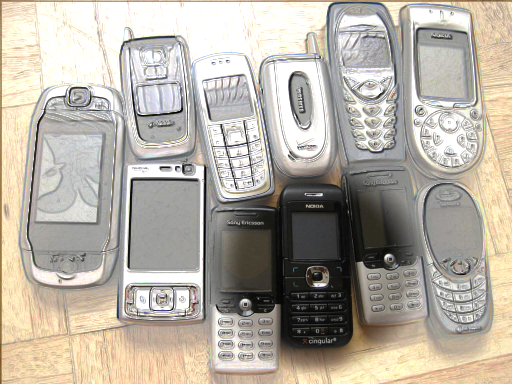
You might have come across the trend of using old phones. So called “Dumbphones”. They’re cheap, reliable, time tested, don’t have any social media and the battery lasts for weeks. This is a good option as an emergency backup phone or when you go on a cycling tour and want some way of calling help in the case of cases, but they don’t do much more than this. If you managed to detach completely and live your countryside life on a farm, selling your home grown veggies to the other town people, then this might do for you. For most of us other plebs out there, it sadly doesn’t. As for Privacy, they also always track you. If you have a simcard in, you’re tracked. No toggle to turn it off. And always taking out the battery (which you actually can!) is obnoxious and makes you look suspicious.
Option 2: A modern dumbphone

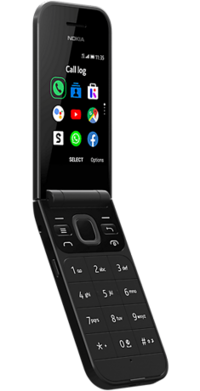
Powered not by Android but KaiOS, these phones try to bring back the oldschool vibe with modern features. KaiOS is co-developed by Mozilla and Nokia. So far so good, right? But… here’s the catch. Many things still don’t work. There aren’t too many, and many times you will pay Smartphone prices for a phone which isn’t a Smartphone. And most importantly, because the system is so simple, it also lacks many safety features. It’s a Dumbphone with a Smartphone price tag.
Option 3: A Normal Android phone
Wait a second, why not just a normal phone? Well, Privacy, Control, Space and Performance. Android is owned by Google. Ever wondered why you can’t install all the Google stuff, and many times the vendor bloat (proprietary software) either? That’s why. Your system is locked down, and depending on the phone it’s not possible to fully unlock it, or only with a lot of difficulties. Also, if you log in to a Google Account, your phone is tracked from front to end. One example. Google constantly Scans all Networks around you and builds a real time map of all devices and locations. This constant pinging of Google’s servers eats your Battery, besides for the privacy issues. If you have a normal Android phone, then it’s constantly snitching away all Networks around you and their locations (via Signal strength) to Google.
Option 3.1: A Normal Android Phone without a google Account
Now, it’s possible to use an Android phone without ever logging into a Google account. This deals with the Google account linkage, but still won’t allow you to delete proprietary bloatware, and you still have a locked down phone
Option 4: Custom Roms
And this is where the real juice is. Basically, you delete stock Android and replace it with a much more usable Custom Rom. There are basically 3 Options. LineageOS which runs on many phones as well CalyxOS and GrapheneOS which only run on Google Pixels. Lineage is good to upgrade whatever phone you have. Android is, at it’s core, open source. So it can be modified and all the blat and spyware removed. However, lineage, while better, is not super secure either, and you still need a phone which can be unlocked in order to install it.
Option 5: The answer

Google Pixel with GrapheneOS. Period. It’s not even close. GrapheneOS is an incredible Operating system with a very dedicated supportbase. It has many features that Android doesn’t have, some were even implemented from GrapheneOS into mainline Android! And the best: No bloatware. You can delete everything, it’s super energy efficient and open source. You own your phone.
The one drawback: Only on Google Pixels (for technical reasons). Ironic, since the purpsoe is to degoogle the phone. But… I have good news. I will tell you all about Google Pixels, and also, better yet, Graphene announced an official Partnership with Motorola, so starting in 2027 there might be GrapheneOS Motorola phones.

Until then, there are only a few options. It’s beautiful how this limitation solves choice paralysis. No comparing dozens of phones from many makers. Only about 10 phones from one maker. And luckily, some are clearly better than others.
Don’t buy a new one. Don’t buy an ancient one. Older phones aren’t supported as long, newer ones are too expensive for what they can do. The sweetspot is with Pixel 8 and 9. The Pixel 8 Pro has issues with Wifi connection. It can literally start dying down, due to Hardware failure. If you want a Telescope camera, either try your luck with an 8 Pro, or better yet get a 9 Pro. If you don’t need it, the normal 8 and 9 will work just fine. 10 and 11 are not really worth it, in my opinion. If you’re on a tight budget you can get a 7a which will be supported for another 2 years, or a 6a if you’re on an even tighter budget.
Leave a Reply